

The construction PM operating system.
Training, tools, and real-world scenarios in one place — for people who run construction. Real problems, real project-management decisions, and a practical standard for running the work, protecting the company, and supporting the field.
7-day full-access trial, no credit card · $300/month for individuals · company plans from $1,250/month (up to 5 users) · cancel anytime
Who it's for
Commercial, industrial, residential, heavy civil, and specialty — every contractor type runs the same core PM work.
Project Managers
Run the contract, the money, and the forecast without living in fifteen spreadsheets.
Project Engineers
Learn the standard while doing the work — every tool links to the chapter that teaches it.
Superintendents
Takeoffs, photo logs, and utility conflicts that feed the PM's paperwork automatically.
Company admins
One company account, role-based access, team training reports, and every project in one place.
The problem it solves
Construction project management is judgment work — contract protection, risk reduction, field support, and accuracy under pressure. But the knowledge lives in a few veterans' heads, and most PM tooling is written for software teams, so it falls apart against a real change-order fight, a differing site condition, or a pay application under scrutiny. Hard Hat Standard puts the standard, the training, and the tools in one place so a PM can run the job right the first time.
See the platform in action
The real product, running a real (anonymized) job — not a mockup.
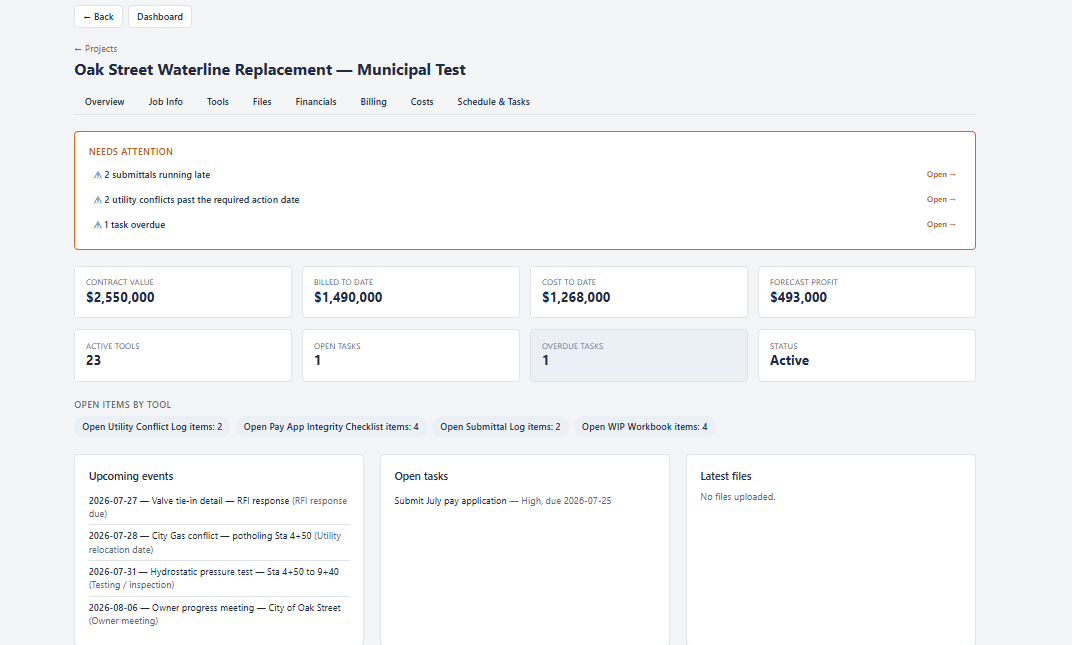
The project dashboard
Monday-morning answers in one view — late submittals, utility conflicts past their action date, billed to date, and every active tool on the job.
What's included
53
working tools
Trackers, checklists, takeoff sheets, and letters — available today, with 61 planned across the full toolkit. In the browser, autosaving, exportable to Excel.
35
manual chapters
The full construction PM manual, from contract reading to closeout — each chapter linked to its tools.
8+
graded tests & assessments
Academy modules with lessons and server-graded tests, tracked on your profile.
1
workspace per project
Job info, tools, files, financials, calendar, and tasks — connected, not scattered.
How it works
Built for a PM with 30 minutes, 50 emails, and a superintendent waiting on an answer.
Set up your project
Fill out the digital job info sheet — only the name is required. Pick your role (prime or sub) and project type, and the right tool set is pre-selected: a waterline job gets the Pipe Takeoff and Utility Conflict Log without you hunting for them.
Run the work
Log RFIs, submittals, change events, quantities, and deliveries in tools that open in Simple Mode — the dozen columns a PM actually scans, with the full spreadsheet one click away. One button puts every tool deadline on the project calendar.
Stay ahead of it
The dashboard answers the Monday-morning questions: what's late, what's at risk, what needs action. Deadlines sync to the Google, Outlook, or Apple calendar you already check.
Learn it, then do it
The manual teaches the standard; the tools enforce it. Every chapter links to the tools that produce its PM outputs, every academy module ends in a graded test, and your training record lives on your profile — useful for you, visible to your company.
Why it's different
Not a certification course
No badge to frame. It's a working operating system for running actual construction jobs — the manual teaches the standard, the tools enforce it on live work.
Not generic PM software
Built for the way construction runs — RFIs, change orders, pay apps, utility conflicts, closeout — not repurposed corporate-PM theory sold as a checklist.
One connected system
Field, office, schedule, cost, and project info in one workspace, grounded in a single standard: be accurate, verify, document the truth, protect the company, support the field.
Organized the way the job runs
Contract admin
RFI Log · Submittal Log · Change Order Log · notice letters
Quantities & money
Quantity Tracker · Pay App Integrity Checklist · WIP Workbook
Field operations
Takeoff sheets · Photo Log · Utility Conflict Log · productivity
Closeout
Closeout Tracker · punch list · as-builts · final acceptance
Who built it
Hard Hat Standard was built by Logan and Dale — construction people, not a software vendor — to preserve hard-won field and office knowledge and turn it into tools the next generation of PMs can actually use. Built from real experience, real project problems, and real lessons learned.
Simple, honest pricing
Everything included at every level — $300/month for an individual PM, company plans from $1,250/month for up to 5 users. One invoice per company, per-user cost drops as your team grows, cancel anytime.
See full pricing →Try it on your next project
Seven days of full access, free — read the whole manual, set up a project, run every tool. No credit card required. If it doesn't save you time in the first week, walk away.
Start your free trial